Choosing an eSIM for a conference trip is a different decision than choosing one for a holiday, because the stakes of losing connection during a client call are higher than losing connection during a sightseeing walk. This checklist will walk you through exactly what to look for before LEAP 2026, so you pick a plan that actually matches how a conference week works, not just how a beach holiday works.
– Constant messaging: Coordinating meetings, follow ups, and last minute schedule changes with clients and colleagues throughout the day.
– Document sharing: Sending decks, PDFs, and contracts over WhatsApp or email between sessions.
– Video calls back to your office: Briefing colleagues who couldn’t travel, often from a hallway or hotel room between sessions.
– Live updates and event apps: Many conferences run their own schedule and networking apps, which pull data continuously in the background.
– Social media coverage: If part of your job at LEAP involves posting live updates or photos for your company’s channels, factor in the additional upload volume that comes with regular content posting throughout each day.
– Payment apps and transport booking: Ride hailing, food delivery, and any local payment apps you use throughout the trip.
Data reliability, in a business travel context, means your connection working consistently enough that you never have to explain a dropped call or a late response as “sorry, my signal cut out.” It’s less about total gigabytes and more about whether the connection holds up exactly when you need it, during a call, a payment, or a time sensitive message. A plan with plenty of data but poor network partnerships is less useful than a smaller plan on a strong, well connected network.
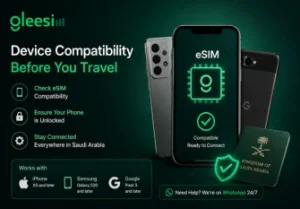
Most smartphones from 2020 onward support eSIM, including iPhone XS and later, Samsung Galaxy S20 and later, and Google Pixel 3 and later. Confirm your specific model supports eSIM and that it’s carrier unlocked well before your trip, ideally by checking your phone’s settings menu for an eSIM or “Add Cellular Plan” option, rather than discovering an incompatibility issue at the airport.
| Approach | Best For | Drawback |
| Home carrier roaming | Very short trips, low data needs | Expensive per day, unpredictable final bill |
| Local SIM purchased on arrival | Travelers who want a local number | Time lost on arrival, passport registration |
| GleeSim eSIM | Business travelers who want zero setup friction | Data only, no local voice number |
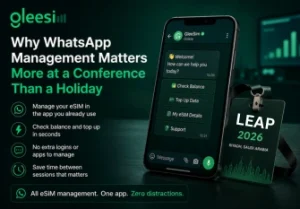
On a holiday, if you need to check your data balance, it’s a minor inconvenience to open an app. During a packed conference schedule, where every spare minute between sessions counts, having your eSIM’s balance check and top up process live inside the same app you’re already using to message contacts and coordinate meetings removes an entirely unnecessary step from your day.
GleeSim’s Saudi Arabia eSIM plans are built around exactly this kind of trip, sized in 15 and 30 day options so you’re covered whether you’re flying in for LEAP alone or combining it with other Riyadh meetings. Full details specific to the conference are in our LEAP 2026 guide.
How much data does a typical 4 day conference use? It varies widely, but between messaging, document sharing, and a handful of video calls, most business travelers use somewhere between 2 and 5 GB across a 4 day event, depending on how much they rely on video calls versus text based coordination.
Can I keep my banking apps working while using a travel eSIM? Yes, since GleeSim’s eSIM runs as a secondary data line, your primary SIM and number stay active in parallel, meaning two factor authentication codes and banking apps continue working exactly as they do at home.
What if I need to top up my data mid conference? Send a WhatsApp message to GleeSim support and we’ll add data to your active eSIM within minutes, no need to find a shop or buy an entirely new plan.
Which phones are not eSIM compatible? Most budget Android models and phones from before roughly 2019 don’t support eSIM. If you’re unsure, check your phone’s cellular settings for an eSIM option, or check the manufacturer’s specifications directly.
Is hotspotting to a laptop reliable on a travel eSIM? Generally yes, though heavier laptop use, particularly video calls or large file transfers, draws down your data allowance faster than phone only use, so budget your plan size accordingly if you expect to hotspot frequently.
Should I bring a backup way to get online in case my eSIM has an issue? It’s rarely necessary given how straightforward eSIM activation is, but knowing your hotel’s WiFi details and having GleeSim’s WhatsApp support number saved gives you a fallback path if you ever run into a setup question.
Ready to sort your connectivity before LEAP? View the full LEAP 2026 eSIM guide and set up before you fly.