You land, your flight mode comes off, and the first thing you need isn’t a taxi — it’s data. Airport SIM counters have queues, kiosk staff who barely speak your language, and prices that creep up the moment they see a foreign passport. There’s a faster route, and it doesn’t involve an app store at all: buying and activating your eSIM straight from a WhatsApp chat.
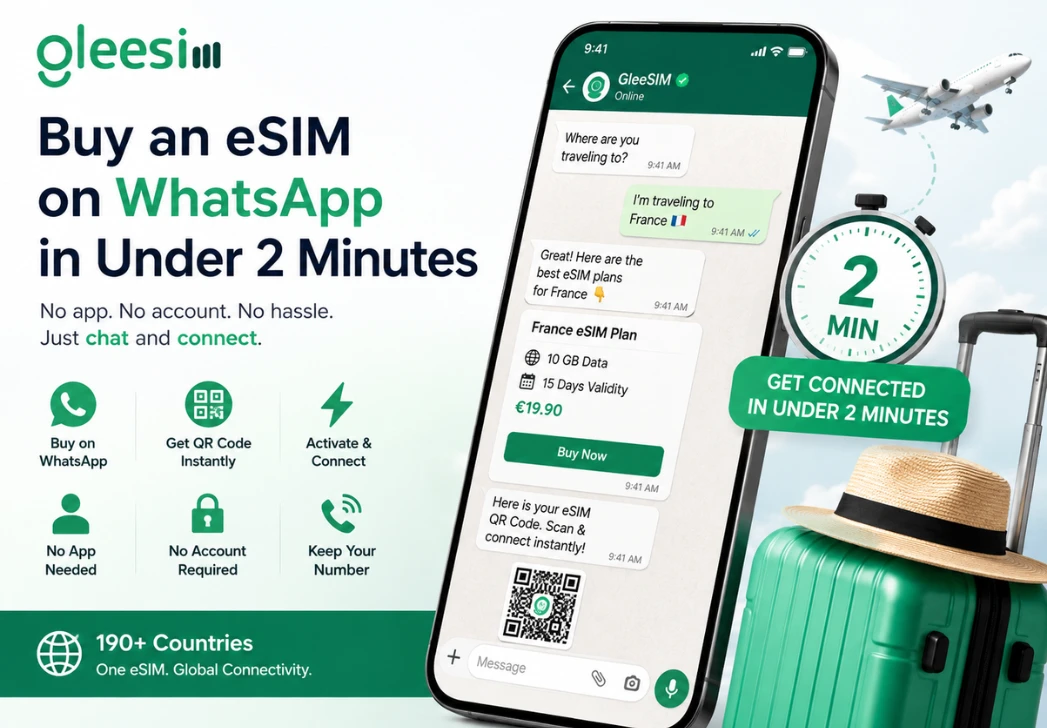
Most travelers already have WhatsApp open when they land, whether they’re messaging a hotel, a driver, or family back home. GleeSIM built its entire eSIM experience around that habit, letting you go from “I need data” to “I’m online” without downloading a separate app or creating a new account. GleeSIM’s WhatsApp-managed eSIM lets you manage your entire experience — from purchasing and receiving your QR code to checking your data balance and topping up — entirely through WhatsApp, so the whole transaction stays inside a single, familiar chat thread.
This isn’t just a gimmick. Businesses on WhatsApp can now run full storefronts inside a conversation — customers browse, ask questions, and complete a purchase without ever leaving the app, using catalog and checkout tools that Meta has built directly into its WhatsApp Business Platform. That’s the same kind of infrastructure powering GleeSIM’s chat-based sales flow, which is why the process feels less like online shopping and more like texting a friend who happens to sell mobile data.
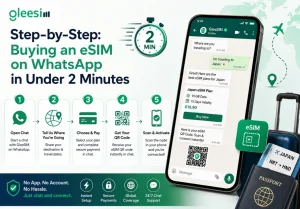
There’s no waiting for an email that lands in spam, no app download eating up storage, and no second account to manage. It’s the same reason travelers heading to major events, like those covered in the US Open Tennis eSIM guide, point to WhatsApp delivery as the fastest way to be online before their flight even lands.
The reason this works so smoothly isn’t magic — it’s the eSIM standard itself. Physical SIM swapping is being replaced by Remote SIM Provisioning (RSP). GSMA, the body behind the global eSIM specification, explains that eSIM enables remote SIM provisioning of any mobile device, letting consumers store multiple operator profiles and switch between them remotely. That over-the-air delivery is exactly what lets GleeSIM push a working profile to your phone through a QR code sent in a chat message, rather than a piece of plastic mailed to your door.
Combine that with WhatsApp’s built-in commerce layer and you get a purchase-to-connection pipeline that skips almost every friction point of the old travel-SIM routine: no store visit, no swapping your primary card, and no losing your home number while abroad.
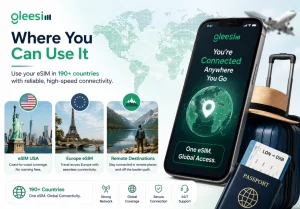
GleeSIM’s WhatsApp checkout works across the same global network the company already supports. If you’re heading to the States, the eSIM USA plans cover coast-to-coast coverage with no roaming fees. Traveling across the continent instead, the Europe eSIM options keep you connected from city to city without swapping profiles at every border. And if your trip takes you somewhere less obvious — a mountain town, a coastal village, a multi-day hike — the same remote-destination eSIM coverage applies, because the WhatsApp bot pulls from the same 190+ country network regardless of how far off the beaten path you’re headed.
Do I need to download anything?
No. The entire process, from browsing plans to receiving support, happens inside WhatsApp itself.
Will I lose my regular number?
No — the eSIM runs alongside your existing SIM, so calls, texts, and your WhatsApp number keep working exactly as before.
What if my phone isn’t eSIM-compatible?
Most phones released since 2019 support eSIM, including recent iPhone, Samsung Galaxy, and Google Pixel models. Check your settings for an “Add eSIM” or “Add Mobile Plan” option before you buy.
Is it actually faster than an app?
Yes — there’s no install, no permissions screen, and no account setup. You’re simply continuing a conversation you already know how to use.
The fastest way to test this for yourself is to start the chat now, before your next trip catches you off guard at arrivals. Message GleeSIM on WhatsApp to see your destination’s plans, pick your data allowance, and get your QR code sent straight to the thread — all in the time it takes to board.
Two minutes, one chat window, zero SIM-card hassle. That’s the whole pitch, and it holds up the moment you land.