Need a travel eSIM sorted right now, not after downloading an app, verifying an email, and creating a password you will forget by your next trip? This article walks through exactly how to buy and activate a GleeSim eSIM entirely inside WhatsApp, start to finish, in under two minutes. After reading this, you will know exactly what to expect at each step before you even open the chat, and why the two-minute claim is not just marketing shorthand.
Anyone who wants a working data plan fast, whether you are messaging GleeSim from your couch the night before a flight, standing at the gate realizing you forgot to sort out connectivity, or simply someone who has been burned before by a provider that promised quick setup and delivered a twenty-minute registration form instead.
QR activation: the process of scanning a unique code with your phone’s camera to install a mobile network profile, the single step that replaces what used to be a store visit, an ID check, and a manual setup process at a physical counter.
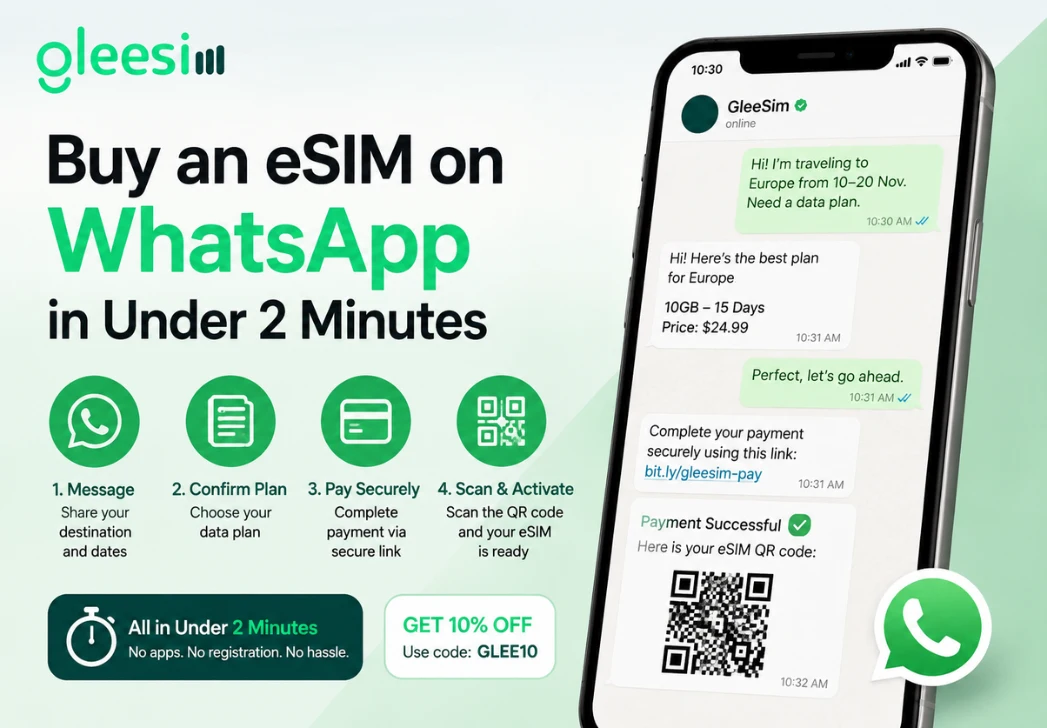
Most of the time in a typical eSIM purchase goes to account creation, not the activation itself. Downloading an app, verifying an email address, setting a password that meets some arbitrary complexity requirement, then finally reaching an actual purchase screen, that sequence alone often takes longer than GleeSim’s entire process end to end. GleeSim skips every one of those steps because there is no account to create in the first place, your WhatsApp number is the only identifier needed, and it is already verified simply by virtue of being the number you are messaging from.
Knowing your destination and rough trip length is genuinely all you need. If you are covering more than one country, mention that upfront so GleeSim can quote a multi-country plan in the same conversation rather than requiring a second purchase later once you realize your itinerary crosses a border you had not initially planned for. If you already know roughly how much data you tend to use, mentioning that helps GleeSim size the right plan the first time, though the default suggestions are generally well matched to typical trip lengths and use patterns.
Once your eSIM is scanned and installed, most phones will prompt you to choose whether it becomes your default line for data, calls, or both. For a travel eSIM, you will typically want to keep your home SIM as the default for calls and texts, and set the new GleeSim eSIM as the default for cellular data, so you are not accidentally burning through your home provider’s expensive roaming data instead of your new plan.
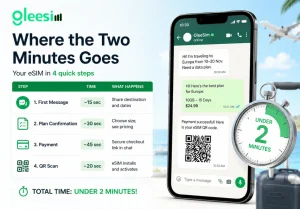
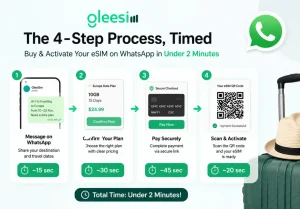
| Step | Time | What Happens |
| First message | ~15 sec | Share destination and dates |
| Plan confirmation | ~30 sec | Choose size, see pricing |
| Payment | ~45 sec | Secure checkout link in chat |
| QR scan | ~20 sec | eSIM installs and activates |
Does this really work in under two minutes for everyone? For most straightforward single-country trips, yes. Multi-country plans or unusual data needs may take an extra minute or two of back and forth to size correctly, though the core mechanics stay just as fast.
Do I need to already have an account with GleeSim? No, there is no account. Your WhatsApp conversation is the entire transaction record, and there is nothing to log back into on a future trip beyond messaging the same thread again.
Can I do this from the airport if I forgot to set up ahead of time? Yes, as long as you have wifi or minimal existing data to complete the WhatsApp exchange, the whole process still fits comfortably before boarding, even with a fairly tight connection window.
What happens after I scan the QR code, is there anything else to do? Your phone confirms the eSIM is installed, and you may need to set it as your active data line under your cellular settings, a quick extra step covered in GleeSim’s activation guide if you want a walkthrough.
Is the two-minute claim realistic for someone who has never bought an eSIM before? Yes, since the WhatsApp conversation walks you through each step conversationally rather than requiring you to navigate an unfamiliar app’s menu structure on your own, which is often where first-time users lose the most time with other providers.
Is there a way to test the process without committing to a purchase first? Messaging GleeSim to ask questions about a plan before buying costs nothing, so you can walk through steps one and two, browsing and pricing, before deciding to move forward with payment.
See it in action on the GleeSim WhatsApp page or start now at offers.gleesim.com.
Use code GLEE10 when purchasing via WhatsApp
No registration required Purchase as a guest Under 2 minutes Buy & manage directly via WhatsApp
Save 10% with GLEE10