Have you ever tried to talk your mother through installing an app, creating an account, and scanning a QR code, over a crackling phone line, while she is standing in an airport in another country?
If you have, you already know how that goes. And if you have not, you will, because the entire travel eSIM industry has been built by people who assume everyone finds this stuff obvious. They do not.
This article will help you to understand why standard travel eSIMs fail older and non-technical travellers so consistently, what a genuinely simple eSIM for non tech savvy users looks like, and how to arrange travel data for elderly parents without a support call at midnight. After developing a complete understanding, you can make a better decision on how to keep the people you love connected without turning yourself into their IT department.
The failure is not about intelligence. It is about assumed knowledge, and the industry assumes an enormous amount of it.
App stores assume a password: Many older users do not remember their Apple ID or Google account password, and the reset flow needs an email they may only check on a laptop at home. Account creation assumes email fluency: Verifying a code from an inbox, on a phone, while an app waits in the background, is a genuine multi-tasking challenge on a small screen. QR codes assume camera confidence: Scanning a code displayed on the same phone you are scanning with is genuinely confusing, and it defeats people of every age. Settings menus assume orientation: Settings, then Mobile Data, then Add eSIM, then Data Roaming. Four levels deep, in a menu they have never opened. Everything assumes they will not panic: They will. Being abroad, alone, and disconnected is stressful, and stress destroys technical performance in anyone.
Now stack all five, in an unfamiliar airport, after a long flight. That is the actual user experience being shipped.
Here is the pattern that repeats in thousands of families every summer.
Your dad lands. Something did not work. He calls you, using the last of his roaming credit or a borrowed phone. You are 3,000 miles away, trying to describe a settings menu you cannot see, on a phone model you do not own, to a man who is now embarrassed and frustrated.
Nobody wins. And the root cause is not your dad. It is a product that was designed for a confident 28 year old with fast wifi and a good mood.
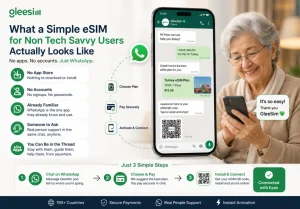
The fix is not a better tutorial. It is fewer things.
Assisted activation: A setup model where a real person guides the traveller through installing their eSIM in a live conversation, rather than leaving them to follow written instructions alone.
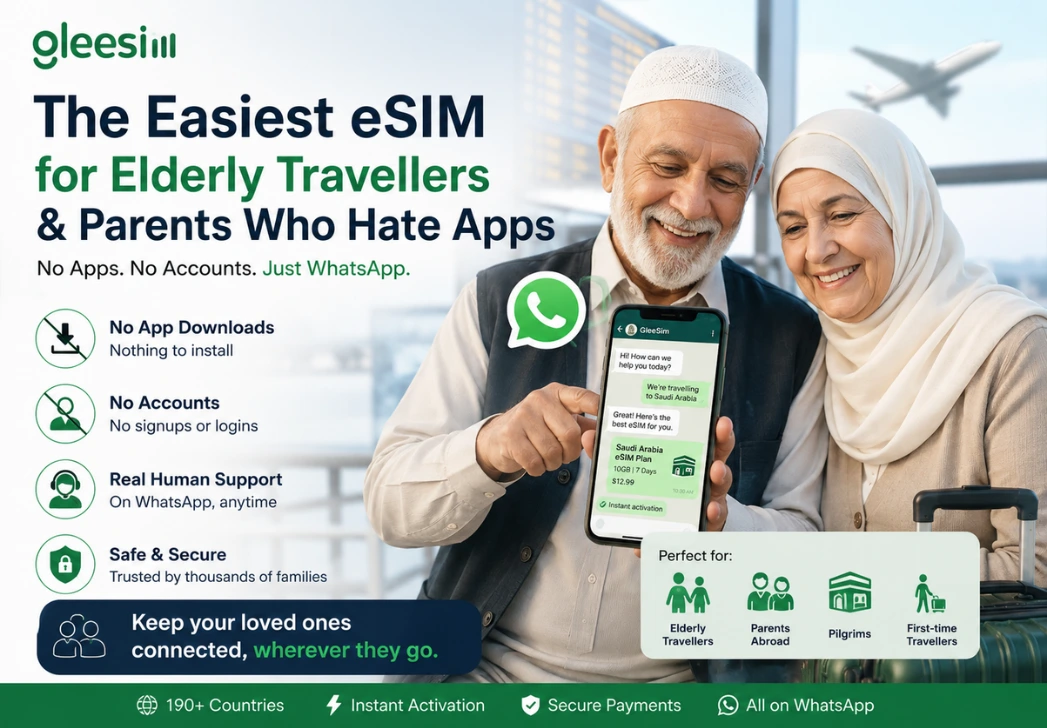
GleeSim runs on WhatsApp, and that single choice removes almost every failure point listed above.
No app store: Nothing to download, so no forgotten Apple ID and no password reset at a departure gate. No account: No email verification loop, and no new password to write on a piece of paper and lose. Already familiar: Older travellers use WhatsApp constantly, to speak to grandchildren, to family groups, to friends. It is possibly the one app they are completely comfortable in. Someone to ask: If they get stuck, they type a message. A human answers. In the same window they already know how to use. You can be in the thread too: Which is the part that quietly changes everything.
Every other provider leaves the traveller to self-serve. That is fine for a confident user. For a nervous 72 year old in a foreign terminal, it is the whole problem.
WhatsApp is a conversation. So when your mother is standing in Jeddah airport and her phone says no service, she does not need to find a support page, or an email address, or a ticket form. eSIM for Saudi Arabia She opens the chat that is already open and types “it is not working”.
That is a support experience she can actually use. Because it is the same thing she does when she messages you.
| Typical eSIM app | GleeSim on WhatsApp | |
| Needs an app store password | Yes | No |
| Needs a new account and password | Yes | No |
| Needs email verification | Usually | No |
| Interface they already know | No | Yes |
| Can ask a question mid-setup | No, ticket only | Yes, instantly |
| Can a family member help remotely | Only by phone call | Yes, in the same chat |
| Steps for the traveller | 9 to 12 | 3 |
| Failure point if they get stuck | They are stranded | They send a message |
That last row is the one to read twice.
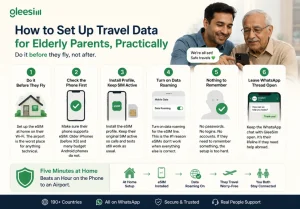
Do it before they fly, not after. Sort the eSIM at home, on their home wifi, with you in the room if possible. The airport is the worst place to attempt anything technical. Check the phone first. Not every handset supports eSIM. Older iPhones before the XS and many budget Android phones do not. Confirm this before you buy anything. Install the profile, then leave the old SIM active. Their home number keeps working for calls and texts from family. The eSIM handles data. Nothing is lost. Turn data roaming on for the eSIM line. This one setting is the single most common reason a correctly installed eSIM shows no data. Check it, then check it again. Write down nothing. If your setup requires them to remember a password, you have already failed. There should be nothing to remember. Leave the WhatsApp thread open. It is their lifeline if anything goes wrong, and it costs nothing to leave in place.
Five minutes at their kitchen table beats an hour on the phone to an airport.
What is the easiest eSIM for elderly travellers? One that needs no app and no account. GleeSim is bought and activated entirely inside WhatsApp, which most older travellers already use daily, so there is nothing unfamiliar to learn.
Can I set up an eSIM for my mum or dad before they travel? Yes, and you should. Do it at home on their wifi, with their phone in your hand. It takes a few minutes and it removes every airport failure scenario.
What if they get stuck at the airport? They message GleeSim on WhatsApp, in the same app they already use to message you. A human replies in the same thread. There is no ticket form and no hold music.
Will an eSIM stop their normal phone number working? No. The eSIM adds a data line. Their existing SIM and number stay active for calls and texts, so family can still reach them normally.
Is there anything they need to remember? No password, no login, no account. That is the entire point. If a provider gives your parents something to memorise, it will be forgotten.
The travel eSIM industry has spent years optimising for people who did not need the help. Meanwhile the travellers who most need connectivity abroad, older parents flying alone, pilgrims, first-timers, are handed a nine step technical process and wished good luck. best eSIM for Umrah
Remove the app. Remove the account. Put the whole thing inside the one app they already trust, with a human on the other end. Suddenly it is not a technical process at all. It is a conversation.
GleeSim is the world’s first travel eSIM you buy, activate and manage entirely on WhatsApp, across more than 190 countries. Nothing to download, nothing to register, nobody left stranded. view GleeSim bundles
Message GleeSim on WhatsApp and set your parents up before they fly, not after.