Are you booking an eSIM for Egypt Nile cruise and pyramid tours and dreading the idea of downloading yet another travel app just to check your data balance? Egypt trips often move fast, from the Giza plateau to a multi-day boat down the Nile toward Luxor and Aswan, and your connectivity plan should move just as easily. This article will help you understand how to get connected across your whole Egypt itinerary using nothing more than a WhatsApp message, the same WhatsApp-managed eSIM approach that has already replaced app-based setup for thousands of Gleesim travelers. After developing a complete understanding, you can make a better decision on how you prepare for a cruise-and-pyramids style trip.
A typical Nile cruise moves through several cities and multiple network zones in a single week. Cairo, Luxor, Edfu, and Aswan each sit on different parts of Egypt’s mobile infrastructure, and a plan built for one city alone will not hold up for the whole route.
Nile cruise itineraries usually run somewhere between seven and fourteen days, and the amount of data a traveler actually needs shifts a lot depending on how much of that time is spent uploading photos of temples versus simply checking messages. Someone documenting every stop on the route for social media will burn through data far faster than someone using their phone mainly for maps and messaging.
Travelers who are new to eSIM shopping in general often benefit from reading the broader WhatsApp travel eSIM overview before locking in a bundle size, since it explains how data allowances translate into real-world usage across a multi-day trip.
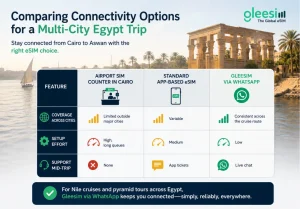
| Option | Coverage Across Cities | Setup Effort | Support Mid-Trip |
| Airport SIM counter in Cairo | Limited outside major cities | High, long queues | None |
| Standard app-based eSIM | Variable | Medium | App tickets |
| Gleesim via WhatsApp | Consistent across the cruise route | Low | Live chat |
Egypt’s Nile cruise season draws a very specific kind of traveler, someone booking a slower, more layered trip rather than a single city break. That means connectivity needs to hold up over many days and several regions, not just one arrival city.
Gleesim’s international data plans were built around exactly this kind of multi-stop travel, giving cruise passengers and pyramid tour groups one dependable line of support instead of a fixed plan that stops working once the itinerary shifts.
Yes, your Gleesim eSIM connects to local Egyptian networks along the river route, giving you a reliable option whenever onboard Wi-Fi is slow or unavailable.
Yes, you can scan your QR code and activate before departure, or wait until you land in Cairo. Either way, the setup only takes a few minutes over WhatsApp.
Simply send a message in the same WhatsApp thread and Gleesim can add data to your existing bundle without starting a new setup.
No. Everything from your first message to any mid-trip top up happens inside WhatsApp, so there is nothing extra to install.
Yes, mention code GLEE10 in your WhatsApp chat before checkout, and the discount described on the GLEE10 offer page applies straight to your Egypt bundle.
A Nile cruise and pyramid tour should feel like a journey through history, not a battle with roaming settings. Message Gleesim on WhatsApp before your Egypt trip and use code GLEE10 for 10 percent off your first bundle, then stay connected from Cairo all the way to Aswan.