It’s day nine in Madinah. Your Rawdah slot opens in forty minutes, the Nusuk QR code won’t load, and your phone has just said you’ve used 100% of your data.
TThat moment is avoidable. So, how much data for Umrah? Most pilgrims need about 3GB for a light 7-day Umrah, 5–10GB for 14 days and 10–20GB for 21 days. The single biggest factor is not trip length. It’s how often you video call home.
This guide shows how much data you need for Umrah by trip length, which apps drain your allowance fastest, and which GleeSim Saudi Arabia eSIM plan fits each trip. Pay once, install at home, and stay online from Jeddah to the Haram.
Not sure how much you use? Try GleeSim’s free 2GB Saudi Arabia trial eSIM before you commit. Claim Your Free Umrah eSIM →
[Image: featured image — alt text above]
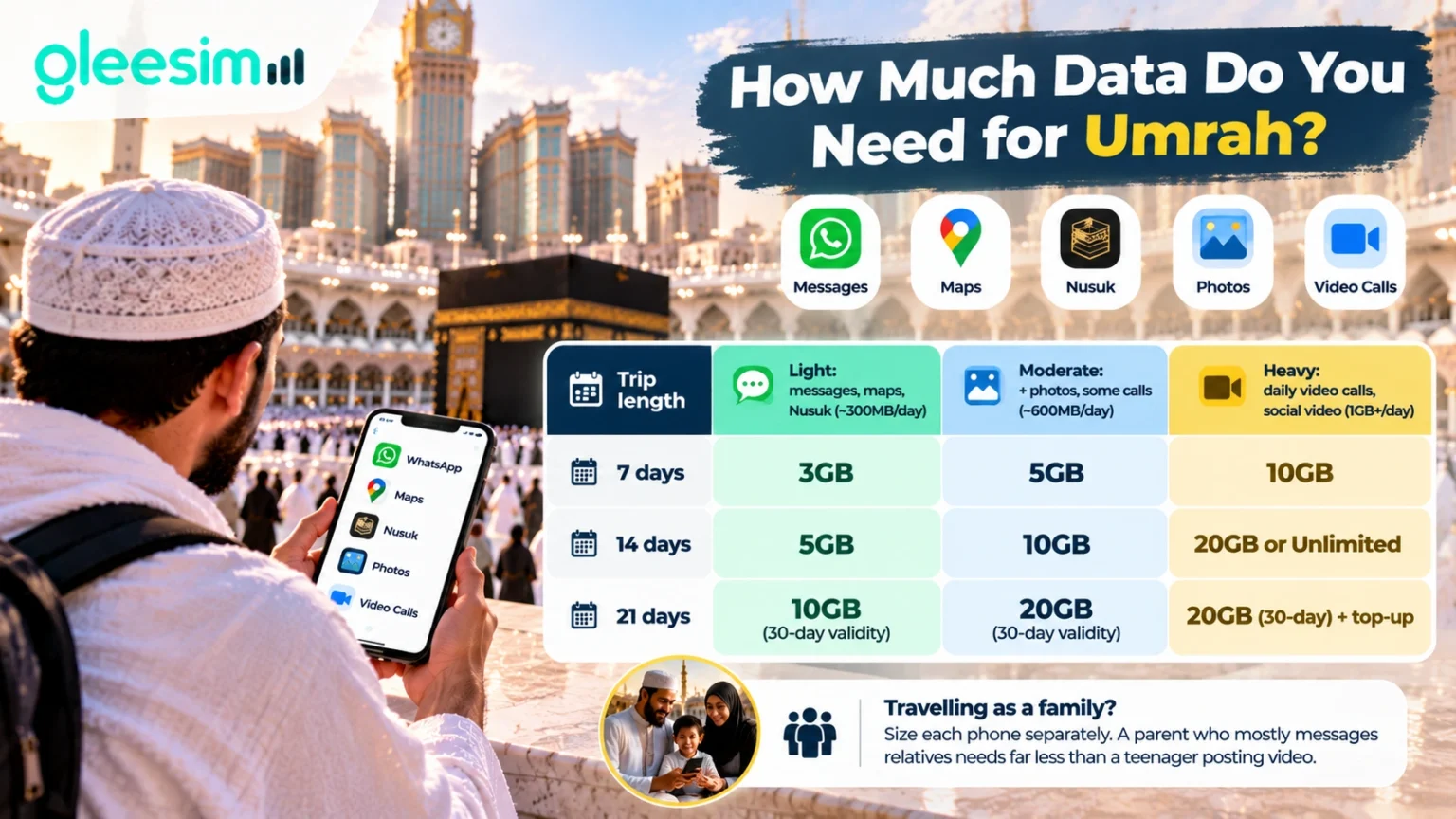
Budget around 300MB a day for WhatsApp messages, maps and Nusuk. Allow about 600MB a day if you also share photos and make some calls, and 1GB or more if you video call family daily. That works out at roughly 3GB for a light 7-day Umrah, 5–10GB for 14 days and 10–20GB for 21 days.
These are GleeSim’s planning bands, built from what pilgrims typically do on their phones. Your own figure will depend on video quality, background apps and how much hotel Wi-Fi you use.
| Trip length | Light: messages, maps, Nusuk (~300MB/day) | Moderate: + photos, some calls (~600MB/day) | Heavy: daily video calls, social video (1GB+/day) |
|---|---|---|---|
| 7 days | 3GB | 5GB | 10GB |
| 14 days | 5GB | 10GB | 20GB or Unlimited |
| 21 days | 10GB (30-day validity) | 20GB (30-day validity) | 20GB (30-day) + top-up |
Travelling as a family? Size each phone separately. A parent who mostly messages relatives needs far less than a teenager posting video.
For a 7-day Umrah, 3GB covers WhatsApp, maps and Nusuk with room to spare. Choose 5GB if you share photos daily, or 10GB if you plan to video call home every evening.
A week usually means a few days in Makkah, a few in Madinah and a Haramain train journey in between. Navigation is heaviest on day one, when everything is unfamiliar.
GleeSim plans that fit a 7-day trip:
The 1GB, 7-day plan exists for messaging-only travellers. For most pilgrims it is too tight once maps and photo sharing start.
For a 14-day Umrah, most pilgrims are comfortable with 5GB for light use or 10GB if they share photos and make regular calls. Daily video callers should choose 20GB or the 15-day Unlimited plan.
Two weeks is where small daily habits add up. A 20-minute video call each night can use more data across the trip than every message, map and Nusuk check combined.
Check the validity, not just the gigabytes. A 14-day stay on a 15-day plan leaves one day of margin. Late arrivals or a delayed return flight can push you past it, so the 30-day plans are the safer choice if your dates might move.
One WhatsApp message. No app, no account, no airport queue. Get Your Umrah eSIM on WhatsApp →
For a 21-day Umrah, you need a 30-day plan because 15-day plans expire before you fly home. Choose 10GB for light use or 20GB if you share photos and call family regularly.
Three-week trips often combine Umrah with Ziyarah in Madinah, family visits or a stopover. Over that time, daily calls home tend to grow, not shrink.
Continuing to Karbala or Najaf after Umrah? Add a separate Iraq eSIM for Ziyarah and manage both in the same WhatsApp chat.
Prices below are as listed on the GleeSim Saudi Arabia eSIM plans page in October 2026. Use code GLEE10 on WhatsApp for an extra 10% off.
| Plan | Data | Validity | Price | Best for |
|---|---|---|---|---|
| Saudi Arabia Free Trial | 2GB | 15 days | Free | Testing your usage before you buy |
| Saudi Arabia 1GB | 1GB | 7 days | $7.34 | Messaging only |
| Umrah and Nusuk 3GB | 3GB | 30 days | $11.18 | Light 7-day Umrah |
| Umrah eSIM 5GB | 5GB | 15 days | $15.58 | 7–14 day Umrah |
| Nusuk eSIM 5GB | 5GB | 30 days | $18.85 | Light use, uncertain dates |
| Umrah eSIM 10GB | 10GB | 15 days | $28.55 | 14 days with video calls |
| Saudi Arabia 10GB | 10GB | 30 days | $31.17 | Light 21-day Umrah |
| Hajj eSIM 20GB | 20GB | 30 days | $48.93 | 21 days, or heavy 14 days |
| Saudi Arabia Unlimited | Unlimited | 15 days | $65.27 | Daily video callers, up to 15 days |
All plans run on Saudi 4G/5G networks (STC, Mobily and Zain) across Makkah, Madinah, Jeddah and the Haramain train.
Ranked from heaviest to lightest, these are the activities that decide your plan size.
Haram tip: at Jummah and during the last 10 nights of Ramadan, thousands of phones share the same masts and speeds can drop. Screenshot your Nusuk permit and Rawdah QR codes so you can show them at the gate even without signal.
Estimated trip data = your average daily mobile data × number of days in Saudi Arabia.
Find your average in two minutes:
| Average daily use | 7 days | 14 days | 21 days |
|---|---|---|---|
| 250MB | 1.75GB → 3GB plan | 3.5GB → 5GB plan | 5.25GB → 10GB, 30-day plan |
| 500MB | 3.5GB → 5GB plan | 7GB → 10GB plan | 10.5GB → 20GB, 30-day plan |
| 1GB | 7GB → 10GB plan | 14GB → 20GB or Unlimited | 21GB → 20GB, 30-day plan + top-up |
These are arithmetic estimates at a constant daily rate. They show the right plan tier, not a guarantee of what any single app will use.
Rule of thumb: round up one plan tier. Running out of data an hour before a Rawdah slot costs more than the few dollars between plans.
| GleeSim Saudi eSIM | STC tourist SIM at Jeddah airport | Home network roaming | |
|---|---|---|---|
| Where you buy | On WhatsApp, before you fly | At the airport, after landing | Through your home carrier |
| What it takes | Guest checkout, email only | Queue, passport and fingerprint registration | Nothing upfront |
| When you’re online | The moment you land | After registration | On landing |
| Cost | Fixed, paid once | Fixed | Daily or per-MB charges |
| Topping up | One WhatsApp message, same eSIM | Shop or app | Carrier add-ons |
| Keep your own number | Yes, your SIM stays in | Only on dual-SIM phones | Yes |
GleeSim is the world’s first travel eSIM run entirely on WhatsApp. You buy, pay, install, check your balance, top up and get support in one chat, with no app to download and no account to create.
Yes. WhatsApp, Google Maps, ride-hailing apps and Nusuk all run on mobile data, so a data-only eSIM covers them. Your home SIM stays in the phone, so your WhatsApp number and bank codes don’t change.
A few things to know:
Buying for your parents? Order from wherever you live and install it on their phones before they fly. One QR code per phone, and each person gets their own data.
Travelling for Umrah this winter or for Ramadan 2027? Get your eSIM sorted in one WhatsApp message before you fly. Get Your Pilgrimage eSIM →
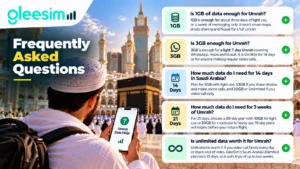
Is 1GB of data enough for Umrah?
1GB is enough for about three days of light use, or a week of messaging only. It won’t cover maps, photo sharing and Nusuk for a full Umrah. Most pilgrims on a 7-day trip are better served by 3GB.
Is 3GB enough for Umrah?
3GB is enough for a light 7-day Umrah covering WhatsApp, maps and Nusuk. It is too little for 14 days or for anyone making regular video calls. For two weeks, start at 5GB.
How much data do I need for 14 days in Saudi Arabia?
Plan for 5GB with light use, 10GB if you share photos and make some calls, and 20GB or Unlimited if you video call daily. Pick a plan with validity that covers your full stay.
How much data do I need for 3 weeks of Umrah?
For 21 days, choose a 30-day plan with 10GB for light use or 20GB for moderate to heavy use. 15-day plans will expire before your return flight.
Is unlimited data worth it for Umrah?
Unlimited is worth it if you video call family every day or share a lot of video. GleeSim’s Saudi Arabia Unlimited plan lasts 15 days, so it suits trips of up to two weeks.
Does WhatsApp use a lot of data during Umrah?
WhatsApp messages and voice calls use very little data. Video calls and sending videos use far more. If WhatsApp video calls are a daily habit, move up at least one plan tier.
Can I top up my Saudi Arabia eSIM if I run out of data?
Yes. Send GleeSim a message on WhatsApp and data is added to the same eSIM within minutes. You don’t need a new QR code or a shop visit.
Does Google Maps use a lot of mobile data?
Maps uses moderate data, mostly when loading new areas and searching for places. Downloading offline maps of Makkah and Madinah before you fly cuts this significantly.
Choose your Umrah data plan around how you actually use your phone
Getting how much data for Umrah right comes down to two numbers: your daily habit and your days in Saudi Arabia. The right plan comes down to two numbers: your daily habit and your days in Saudi Arabia. Light users need about 3GB a week. Daily video callers need closer to 1GB a day. Trips over 15 days need a 30-day plan.
Order a few days before you fly so everyone can install at home. December, New Year and Ramadan 2027 are peak Umrah periods, and you want connectivity sorted before the airport rush.
Land connected. Buy your GleeSim Saudi Arabia eSIM as a guest on WhatsApp — pay, install and be online before you leave Jeddah airport. Use code GLEE10 for 10% off. Message GleeSim on WhatsApp → · Compare all Saudi plans →
Planning your wider trip? Read the full GleeSim Saudi Arabia eSIM guide for 2026.